Lightbeam’s Summer Release 2026 introduces AI Guardrails for Enterprise Data, enabling organizations to safely utilize GenAI and other AI tools like Claude, ChatGPT, Gemini, and Claude Code by controlling access to sensitive data. The release focuses on real-time inspection and policy enforcement to ensure secure AI interactions and prevent data breaches.


Summer Release 2026: AI Guardrails for Enterprise Data
Lightbeam Summer Release 2026 introduces AI Guardrails for Enterprise Data to help organizations safely enable GenAI, copilots, SaaS AI, and agents by controlling what sensitive data AI can reach, use, and expose.

Henna
1 in 5 organizations have already experienced an AI-related breach. When a breach happens, the AI angle doesn’t lower the bill, it raises it, and 60% of AI-related incidents involved data that was already compromised before the AI tool ever touched it.
That is the uncomfortable truth about the AI security conversation most vendors are having, it isn’t a model problem. It’s a data problem wearing a new interface. Employees paste customer records into ChatGPT because it’s faster than opening a ticket. Copilots inherit whatever access their human owner already has, sensitive folder included. Agents retrieve, summarize, and hand off information across SharePoint, Slack, and Salesforce in seconds, using permissions nobody remembered to clean up. None of this requires a compromised model. It only requires sensitive data sitting somewhere it shouldn’t, reachable by something that never gets tired of asking.
Security teams feel the pressure from both directions. Leadership wants AI adoption, not AI avoidance, the mandate is to enable GenAI, copilots, and agents safely, not to block usage and slow the business down. But “safely” only means something if you can answer three questions in real time: what sensitive data can AI reach, whose data is it, and should that specific interaction be allowed, warned, redacted, or blocked?
The Lightbeam Summer Release 2026 answers those questions at the moment they matter. This release introduces Lightbeam AI Security, powered by the new Lightbeam AI Gateway, a real-time control layer that inspects prompts, files, and responses across GenAI platforms and acts on them before sensitive data leaves your organization’s control. It is built on the same Lightbeam Data Identity Graph foundation that already powers data security, access governance, and privacy at petabyte scale.The difference is context. Lightbeam does not just detect that sensitive data appears in an AI interaction; it uses the Data Identity Graph to understand whose data it is, where it came from, who or what can access it, and whether the interaction should be allowed, redacted, warned, blocked, remediated, or audited.
AI Guardrails for Enterprise Data
Most approaches to AI security focus on the edges, filtering prompts here, scanning outputs there, without any real sense of what the data underneath actually is. That is the gap Lightbeam closes with AI Guardrails for Enterprise Data: real-time inspection and policy enforcement for prompts, files, responses, and attachments as they move to and from Claude, ChatGPT, Microsoft Copilot, Gemini, Claude Code, and other GenAI platforms.
AI Guardrails for Enterprise Data: Lightbeam AI Data Security Demo
Approving an AI tool was never the hard part. Controlling what that tool can actually do with your sensitive data is. The Summer Release operationalizes that control across four connected capabilities: apply AI data security policies, enforce least privilege AI access, govern AI use and risk, and secure shadow AI.
Apply AI Data Security Policies
Approving an AI tool is only the first step. Security teams also need a way to let employees use AI productively while ensuring the right data is used in the right way.Lightbeam classifies, labels, and controls sensitive data so approved AI tools use the right data safely. Security teams can apply AI-specific policies to sensitive attributes such as Social Security numbers, credit card numbers, bank account numbers, confidential contracts, source code, merger and acquisition terms, and non-public financial data.
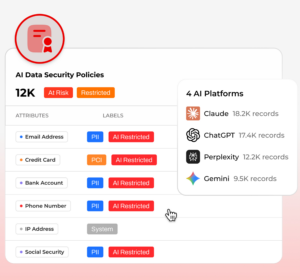
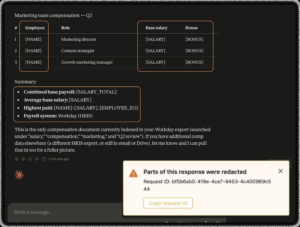
Those policies aren’t limited to a single response. Lightbeam AI Gateway can act on a prompt, an attached file, or a response the moment a policy condition is met, blocking it outright, redacting the specific sensitive values while letting the rest through, or warning the user and letting them decide. Most prompts and responses aren’t malicious, they’re just careless, so redaction is often the policy that keeps work moving without the risk: a prompt asking for a summary of cab-ride expenses doesn’t need to carry a rider’s name and email to get answered, and Lightbeam removes exactly that, nothing more.
Enforce Least Privilege AI Access
AI often starts with permissions the organization already granted, then amplifies them through faster retrieval, summarization, and recombination across systems. Lightbeam maps AI tools, copilots, agents, applications, and third-party SaaS AI to the sensitive data they can reach, then helps security teams identify and remediate excessive access before AI turns quiet oversharing into active exposure.
This is the risk that traditional access reviews miss: a SharePoint site with a permission mistake nobody noticed can sit exposed for months without incident, until a copilot is asked a routine question and retrieves exactly what it was never supposed to surface. Lightbeam shows security teams which files a Gen AI platform has referenced, whether those files were sensitive, and who else has access, so the fix isn’t just blocking the next prompt, it’s revoking the access that created the exposure in the first place.
Govern AI Use and Risk
Lightbeam helps organizations move from written AI policies to operational AI governance. Security, privacy, and governance teams can see which AI tools are being used, which prompts and responses involve sensitive data, which users or departments create risk, what policies were triggered, what actions were taken, and how risk was reduced. Every block, user warning, redaction, allow decision, access review, and remediation action is recorded for investigation, audit, legal, privacy, and board reporting.
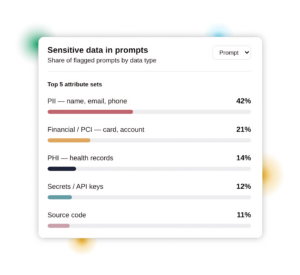
A dedicated AI Security dashboard puts that governance view in one place: sensitive files accessed by AI, prompt outcomes across allowed, masked, and blocked, prompt sensitivity by data class, and the specific attributes AI has cited. And because incidents don’t happen in isolation, that same governance layer powers investigation, when something needs a closer look, Lightbeam gives security teams full visibility into a user’s activity, including their Gen AI interactions alongside their behavior across every other connected datasource, so teams do not have to stitch together disconnected traffic logs, AI console data, and data security findings to answer a simple question..
Enable AI Safely Across Authorized and Unauthorized GenAI Tools
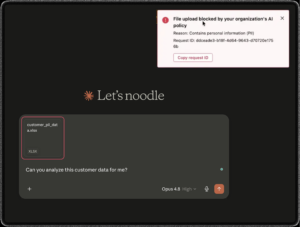
Employees do not stop trying to get work done because a tool has not been approved. They open a personal ChatGPT account, paste in a contract, and move on, invisible to security. Lightbeam’s AI Gateway inspects prompts, responses, files, and attachments as they move to or from GenAI tools, whether sanctioned or unsanctioned. When the destination is not approved or the data violates policy, Lightbeam can block the interaction, redact sensitive values, coach the user, or allow and audit the activity. Lightbeam discovers unauthorized AI use and blocks sensitive data from flowing into unsanctioned GenAI tools, copilots, and AI applications.
What’s new
- AI-specific policies for sensitive attributes including SSNs, credit card and bank account numbers, confidential contracts, source code, M&A terms, and non-public financial data
- Policy actions that block, redact, warn, or allow-and-audit a prompt, file, or response in real time, across Claude, ChatGPT, Microsoft Copilot, Gemini, and Claude Code
- Mapping of AI tools, copilots, agents, and third-party SaaS AI to the sensitive data they can reach, with remediation for excessive access
- A dedicated AI Security dashboard covering prompt outcomes, prompt sensitivity, and sensitive data cited across every connected AI platform
- Investigation workflows that combine a user’s Gen AI activity with their behavior across every other Lightbeam-connected datasource
- Automatic discovery of shadow AI use, with policy-based blocking of sensitive data flowing into unsanctioned GenAI tools and copilots
Lightbeam is different because it connects these guardrails to the patented Lightbeam Data Identity Graph. Many tools can monitor prompts, applications, or model posture, but Lightbeam understands whose sensitive data is involved, who or what can access it, why it exists, how sensitive it is, and what action should be taken. A pattern-matching tool may flag a credit card number in a prompt, and Lightbeam can understand that the card belongs to a specific customer, that the file carrying it was overshared, and that an AI tool just retrieved it. That context turns detection into a decision: block, redact, educate the user, allow, remediate, or audit.
Discovery is automatic: Lightbeam onboards a Gen AI platform as a monitored datasource the moment it observes traffic to it, so there’s no manual setup standing between a new shadow AI tool showing up and Lightbeam seeing it.
From data visibility to AI guardrails
A prompt filter that doesn’t know whether a file contains a customer’s SSN or a Medical Record number, can’t make a good decision, it can only pattern-match and guess. The Lightbeam Data Identity Graph is what turns a guess into a decision: it connects every prompt, file, and response to the identity, sensitivity, and business context behind the data, so AI guardrails can answer the questions that actually matter:
- What sensitive data can AI reach?
- Whose data is it?
- Should this specific interaction be allowed, warned, redacted, or blocked?
- Can we prove the control worked?
That last question is where this release closes the loop. Lightbeam AI Gateway doesn’t just decide in the moment, it logs the decision, so every block, redaction, and warning becomes audit-ready evidence instead of a one-time save.
See it in action
To see how Lightbeam AI Security blocks, educates, redacts, and gives you full lineage into what AI can reach, register for our Demo forward Webinar “Safely Enable AI Across Your Enterprise”
Assess Your AI Data Security Readiness
In a 90-minute interactive workshop, Lightbeam helps you score your AI data security maturity, identify your biggest exposure gaps, and build a roadmap to reduce risk.
FAQ
How does Lightbeam protect sensitive data used by GenAI tools?
Lightbeam uses its AI Gateway and Data Identity Graph to inspect prompts, files, attachments, and responses across GenAI tools such as ChatGPT, Claude, Microsoft Copilot, Gemini, and Claude Code. It identifies whose sensitive data is involved and can automatically block, redact, warn, remediate excessive access, or allow and audit the interaction based on policy.
Watch it in actionCan employees use ChatGPT, Claude, Gemini, and Microsoft Copilot without exposing sensitive company data?
Yes, when organizations implement AI data security controls that govern what information users and AI tools can access and share. Lightbeam applies real-time guardrails across ChatGPT, Claude, Gemini, Microsoft Copilot, and Claude Code to identify sensitive data in prompts, files, and responses and enforce policies such as blocking, redaction, warnings, and access remediation.